- Published on
Cracking eufy's Encrypted SD Recordings - Recovering 23 Days of My Own Footage
- Authors

- Name
- Christian Guevara
- @cgTheDev
Content
- The Problem
- A Note on AI Collaboration
- The Journey
- Rule #1: Back Up Before You Touch Anything
- Reading the Format
- The Wall: It Looks Like the Whole Keyframe Is Encrypted
- Dead End #1: The Live Key
- Dead End #2: The Download Stream Carries No Key
- Dead End #3: The End-to-End (ECC) Path
- The Paper That Said It Was Possible
- The Breakthrough: Hooking the Random
- The Five Keys
- The Green Video
- Decrypting 23 Days
- Firmware and Newer Versions
- Results
- Key Takeaways
- What It Cost, and the Part Worth Saying
- Final Thoughts
The Problem
A while back I reverse engineered my eufy S350's .zxvideo format and bulk-exported 5,656 clips. At the end of that post I waved off the AES key: on that camera only a tiny header region was encrypted, so I didn't need it.
This time the camera didn't let me off so easy.
I have a eufy Indoor Cam 2K (model T8400), serial T8400P3223020166, running firmware 2.2.0.0. Its 128 GB microSD card held 17,161 .dat files - about 75 GB of continuous recording, 23 days of August 2024 plus a few test clips from this month. Two-minute segments, H.264 1080p at 15 fps, AAC audio.
I wanted my own footage off my own card. The eufy app only lets you export clips one at a time, and once again I was not about to click through seventeen thousand downloads.
Plot twist: on this camera, every keyframe is AES encrypted, with a key that rotates every week and is never written to the card. The motion frames in between are plaintext, but without the keyframes you have nothing. This one took weeks of dead ends - and even after I had the keys, it tried to hand me a screen full of green.
A Note on AI Collaboration
Same honesty as last time: I did this with Claude, and the heavy reverse engineering was the model's work. I own the camera, the card, and the account; the direction, the pushing, and the stubbornness were mine.
Here's the part I want to be transparent about, because it's the most interesting bit. The AI kept getting stuck, and more than once declared it impossible. At one point a safety filter halted a response mid-answer, because "decrypt this camera's video" reads like something shady until you remember it's my camera and my recordings. At other points the model wrote confident conclusions like "bulk decryption is not achievable with camera + card + account" and wanted to settle for extracting the audio track.
I didn't accept that. I kept feeding it angles:
- "You have the physical camera, the physical SD card, and I'm the owner - why can't I get my own videos?"
- "Use my Unraid server for anything you need, install whatever."
- "The paper mentioned brute force since the string isn't that big - we're good."
- "Reanalyze from first principles."
Every one of those nudges moved it past a wall it had declared final. The breakthrough came from combining my refusal to quit with the model's ability to grind through ARM disassembly and symbolic execution. Neither of us solves this alone. That's the honest shape of it.
The Journey
Rule #1: Back Up Before You Touch Anything
The card is the only copy of 23 days of footage. Before any analysis, I streamed a full, read-only, sha256-verified backup to my Unraid server - all 17,161 files, byte-for-byte identical. The originals were never written to. Every experiment after this ran against the backup, so there was no way to corrupt the source.
Reading the Format
Each .dat file is a chain of records, every one starting with the magic bytes XZYH:
0  4  magic 'XZYH'
4  1  stream type: 0x14 video, 0x15 audio
6  4  record size minus 16
10 2  frame type: 1 = P-frame, 3 = I-frame (| 0x100 = more fragments follow)
16 4  payload length
...   header is 38 bytes for video, 32 for audio
Parsing it was straightforward. The findings were not reassuring:
| Part | State |
|---|---|
| Audio (AAC-LC, 16 kHz) | Plaintext, decodes fine |
| P-frames (inter-frames) | Plaintext H.264 |
| I-frames (keyframes) | Fully AES encrypted |
Each keyframe is ~90 KB, one roughly every two seconds, split into 64,000-byte fragments. Without them you can't start decoding a single group of pictures.
The Wall: It Looks Like the Whole Keyframe Is Encrypted
My first hope was that only a small header was encrypted, like on the S350. A quick statistical test killed that hope. Plaintext H.264 slice data is full of 00 00 03 escape sequences and byte-value structure; AES ciphertext is uniform noise. Measuring one file:
| Region | Entropy (bits/byte) | 00 00 0x escapes | Zero bytes |
|---|---|---|---|
| P-frames (known plaintext) | 7.599 | 24,863 | 9.28% |
| Keyframe, whole | 7.998 | 0 | 0.41% |
| Keyframe, bytes 128 to end | 7.998 | 0 | 0.41% |
Entropy of 7.998 with zero escapes looks like textbook encryption, so I concluded the entire keyframe was ciphertext and I needed the key. That reading was half right, and the other half cost me a day of green video later. (Spoiler: a densely packed CABAC keyframe slice is also near-8-bit entropy with almost no escapes, so this test can't actually tell "encrypted" from "compressed." I didn't know that yet.)
Dead End #1: The Live Key
The community library eufy-security-client can log into your account and open a P2P livestream, during which the camera hands the app an AES key (RSA-wrapped with a per-session key the app generates). I captured it: 6c4e5631734f5452695a54536869764e.
It decrypted the live stream perfectly. It did not decrypt a single keyframe on the card. The storage key and the session key are different things.
Dead End #2: The Download Stream Carries No Key
Next idea: ask the camera to P2P-download an SD file and capture whatever key it sends. I dumped the raw frames. The library kept throwing pkcs decoding error (the same unresolved complaint in eufy-security-client issues #9 and #586), so I looked at the bytes it was trying to RSA-decrypt as a "key":
wrapped-key field  = 14 f9 cb 13 48 57 6d ea 31 64 33 1c ...
card keyframe      = 14 f9 cb 13 48 57 6d ea 31 64 33 1c ...
They were identical. The bytes the library treats as a wrapped key are just the encrypted video itself. On this camera the download path ships the raw storage-encrypted frames with no key attached at all. There was nothing to capture.
Dead End #3: The End-to-End (ECC) Path
The app's media library libmega_media_sdk.so has a class HistoryMediaDecrypt with a method processEccV9VideoFrame that calls decrypt_AES_key in libecc-encryption.so - an elliptic-curve path where each frame carries an ECDH-wrapped key. That would have been decryptable offline with the right private key.
Except the account's ecc_private_key came back empty: end-to-end encryption was off, so no ECC key was ever provisioned. These files don't use that scheme. Another door closed.
This is roughly where the AI concluded the task was impossible and offered me the audio. My response is not printable, but it amounted to "keep going."
The Paper That Said It Was Possible
The push to "reanalyze from first principles" led to the paper that cracked it open: Reverse Engineering the Eufy Ecosystem (Goeman et al., USENIX WOOT'24). Two sentences mattered enormously:
Although the encryption of videos and images slightly differ (i.e., storage format), the encryption key is the same.
and their recovered algorithm, which builds the key from the serial number, the device's PPCS_ID, and a per-file random value, via a function called create_pic_code_v1 with two custom byte-shuffling steps they couldn't reproduce by hand. Their trick: don't reimplement it, execute it with angr and dAngr, hooking the random generator to return the value baked into each file.
So the picture-key function I'd dismissed was the video key all along.
The Breakthrough: Hooking the Random
The function lives in the app's libcrypto-security.so. You can't just load that library on a PC: it's an Android binary with packed relocations that a normal loader (glibc, QEMU) refuses, and it hashes with its own statically-linked crypto. angr sidesteps all of that by lifting the code to an IR and executing only the one function I care about.
The signature, confirmed by tracing:
create_pic_code_v1(char *serial, int l, char *ppcs_id,
                   char *out_rand[10], char *out_key[32])
My earlier attempts had failed because I'd guessed the arguments wrong - I was passing the file's code into the function as an argument. The paper made the real shape clear: the random value is generated inside the function. To reproduce a specific file's key you have to hook that internal generator and force it to return the file's own value.
Where does that value come from? A file on the card called continuefilelink.dat maps every recording to a 10-digit code:
/media/mmcblk0p1/video/continue/20261007105210.dat 0163419399
That code is "01" plus the random: strip the prefix and rand = 63419399. There were exactly five distinct codes across the card - one per weekly key rotation. The key is reproducible given serial, PPCS_ID, and that rand, and the AES-128 key is the first 16 ASCII bytes of the function's output.
The whole thing, hooking the handful of libc helpers and the random source, became one script (derive_key.py):
# the random is generated internally - override it to the file's value
class RandHook(angr.SimProcedure):
    def run(self, *a):
        return rand                      # e.g. 63419399, from continuefilelink.dat
p.hook(base + 0x22af60, RandHook())      # the internal rand source

call = p.factory.call_state(
    base + 0x2209a5,                     # create_pic_code_v1 (thumb)
    SER, 0x10, PPCS, OUT_RAND, OUT_KEY,  # serial, l, ppcs, out buffers
    base_state=st, ret_addr=RET,
)
sm = p.factory.simgr(call)
sm.explore(find=RET, num_find=1)
key = sm.found[0].memory.load(OUT_KEY, 32)[:16]   # 16 ASCII bytes = AES-128 key
Running it for the October code and AES-128-ECB decrypting a keyframe:
key = 89DD11D2DF09ED7D
decrypted first bytes = 00 00 00 01 27 64 00 2a
00 00 00 01 is an H.264 start code; 27 is NAL type 7, a Sequence Parameter Set; 64 00 2a is High profile, level 4.2. A real, valid keyframe header. After weeks of walls, the video just... appeared.
The Five Keys
One key per weekly rotation period, each verified against a keyframe from its own week:
| Week code | Period | AES-128-ECB key (ASCII) |
|---|---|---|
| 0128917936 | Aug 3 to 10 | D08DD350DA0EBF23 |
| 0197394257 | Aug 10 to 17 | C420C89DFC070F7C |
| 0198447120 | Aug 17 to 24 | F188B51E4D7FDB86 |
| 0164949151 | Aug 24 to 27 | A5758D35FD6F76EB |
| 0163419399 | Oct 7 | 89DD11D2DF09ED7D |
(These are specific to my camera's serial and PPCS id. They are useless to anyone else and useless without physical access to this card.)
The Green Video
First batch converted, I opened a clip. The top ~5 rows of the frame were a real, if pixelated, image. Everything below was a flat wall of green. ffmpeg had been muttering error while decoding MB 5 0 the whole time and I'd written it off as cosmetic. It wasn't.
Here's the thing: the top rows decoding proves the key is correct. If the key were wrong, nothing would decode. So the key was right and I was still ruining the picture, which meant I was decrypting something that shouldn't be decrypted.
Back to that entropy test that "proved" the whole keyframe was ciphertext. It lied. A real test settles it in one line - plaintext H.264 slice data, however dense, still can't contain 00 00 00/01/02; ciphertext contains them at random. I built the keyframe two ways and decoded each:
| How I decrypted each keyframe fragment | ffmpeg errors on the full file | Result |
|---|---|---|
| The whole fragment (what I'd been doing) | 118 | green |
| Only the first 128 bytes of each fragment | 0 | perfect 1080p |
Only the first 128 bytes of each keyframe fragment are encrypted; the rest is plaintext H.264. Decrypting the plaintext part was turning the picture to noise. And the most embarrassing part: the eufy-security-client library's live-stream code says exactly this in plain sight - encrypted_data = data[start : start + 128] - I'd read past it three times. The storage format and the live format encrypt the same 128-byte slice; I just assumed "storage" meant "all of it."
Decrypting 23 Days
With the keys recovered and the 128-byte region understood, decryption is fully offline - no camera, no account, no network. For each file: decrypt the first 128 bytes of each keyframe fragment, concatenate everything with the plaintext motion frames and audio, and remux to MP4 with no re-encoding. One file reconstructs to a clean 1080p stream - 51 keyframes, 1,472 inter-frames, zero decode errors, with sound.
Because the camera recorded an empty room most of the time, I ranked files by motion (mean inter-frame size) and converted the ~4,200 files that actually show activity first, leaving the ~13,000 "quiet" files for later. All of it runs on the Unraid box against the backup.
Firmware and Newer Versions
Everything here is for a T8400 on firmware 2.2.0.0, with the Anker eufy Android app 6.1.10_30612. I deliberately did not update the camera, because firmware updates can enable end-to-end encryption (the ECC path above), which changes the whole scheme and would make this approach stop working. If your camera is newer or has E2EE enabled, this won't apply directly - start from the actively maintained eufy-security-client and the WOOT'24 research instead.
Results
- 17,161 encrypted recordings on the card, 23 days of continuous footage, all decryptable.
- 5 weekly keys recovered, each verified against real keyframes.
- 100% offline decryption once the keys exist - no live camera needed, not even for the August 2024 footage.
- Output is a straight remux, so quality is identical to the source.
Key Takeaways
- Back up first, read-only, verified. You get exactly one shot at the original card.
- Pick the right statistic. Entropy can't tell encryption from compression - a dense CABAC frame is near-8-bit too - and trusting it cost me a day of green video. The escape-sequence count (
00 00 00/01/02never appears in plaintext H.264) is the test that actually answers the question. - The key was never on the card or in the stream - it's derived from the serial, the PPCS id, and a per-file random, by a function in the app.
- Don't reimplement obfuscated crypto - execute it. angr ran the real function with its real byte-shuffles; I never had to understand them.
- "Impossible" was wrong four separate times. Each wall had a door; persistence plus the right tool found it.
What It Cost, and the Part Worth Saying
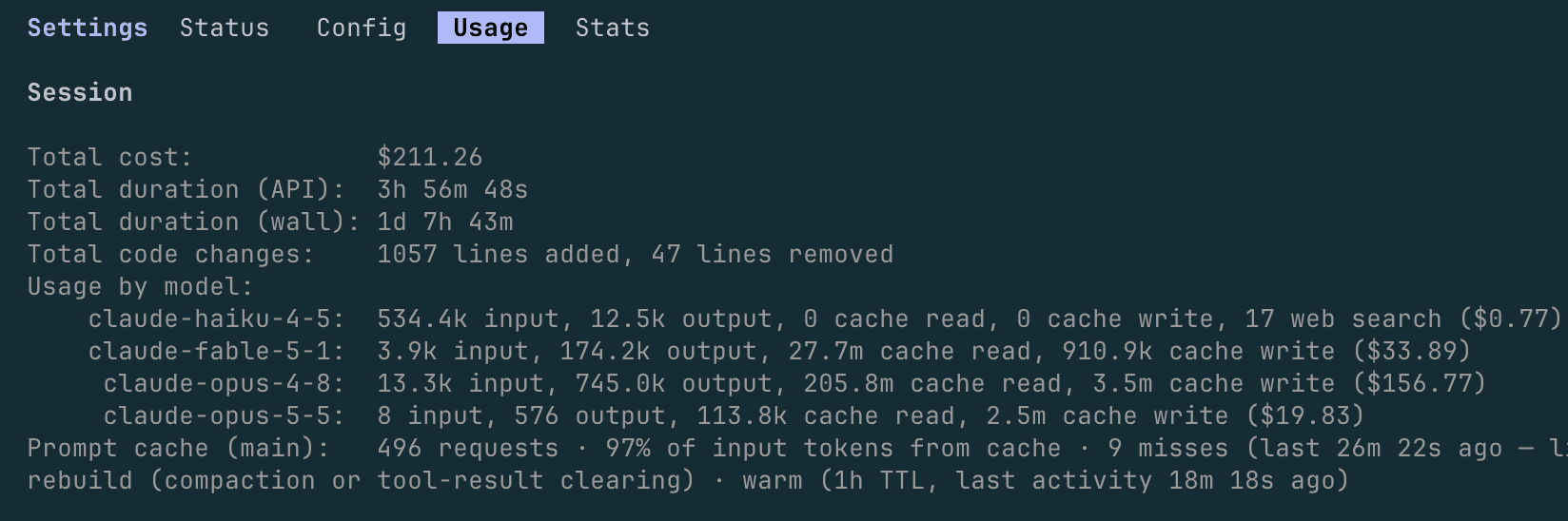
I did this with Claude, through Claude Code, and the meter is public, so here it is: the whole project cost $211.26 in model usage - roughly four hours of actual API time stretched across a day and a half of back-and-forth, most of it spent on the ARM disassembly and symbolic execution.
Two hundred dollars to recover my own footage sounds steep until you price the alternative. This is deep reverse engineering - native-library tracing, symbolic execution of an Android binary, a key scheme three transforms deep - the kind of thing that's a specialist contract measured in weeks, not an afternoon.
But the number isn't the point. The point is what it says about working with these models. Left to its own judgment, Claude hit a wall and told me, confidently, that bulk decryption was impossible - twice - and offered to hand me the audio track and call it done. What turned that around wasn't a smarter model. It was direction: "you have the hardware, you're the owner, keep going." "Use the server." "The paper says brute force is feasible." "Start from first principles." Each of those unlocked a step the model wouldn't take on its own.
That's the real takeaway. These models are genuinely amazing when they're pointed well - they'll grind through disassembly and symbolic execution that no human wants to do by hand, for the price of a nice dinner - but they're only as relentless as the person steering them. The intelligence is real; so is the need for someone who refuses to accept "impossible." Guide it correctly and it's extraordinary.
Final Thoughts
What eufy calls privacy here is a weekly AES key derived from values that are printed on the device and stored on the card next to the video. It keeps a casual snoop out, but the owner of the hardware can always reconstruct it. That cuts both ways: it's exactly why I could get my own 23 days of footage back without the cloud, the app, or an internet connection.
The tools (specific to this camera/firmware; read the comments before running):
- derive_key.py - recover a weekly key from the app's native library with angr
- eufy_dat.py - parse a
.datfile and decrypt/remux it - convert_batch.py - batch decrypt + remux the whole card
- libcrypto-security.so - the native library the key derivation loads (from app 6.1.10_30612)
# 1. recover a key for one weekly code (rand = code without the leading "01")
python3 derive_key.py libcrypto-security.so \
    --serial T8400P3223020166 --ppcs EUPRCAM-254464-NVXDH --rand 63419399

# 2. convert the whole card (keys live in keys.json, which is gitignored)
python3 convert_batch.py --source /path/to/video/continue --dest ~/eufy_mp4 \
    --keys keys.json --keymap file_keys.json
Sources that made this possible:
- Goeman, de Ruck, Cordemans, Lapon, Naessens - Reverse Engineering the Eufy Ecosystem, USENIX WOOT'24. A copy of the open-access paper is mirrored here for convenience (woot24-goeman.pdf); all credit for the key-derivation research is theirs.
- angr and dAngr - symbolic/concrete execution of the native function
eufy-security-clientby bropat - the P2P/account groundwork
Hit me up on Twitter @cgTheDev if you try this on your own camera.
🖖